
Best content automation platform for a SaaS blog: where the draft lands
You already have the research: Search Console queries, a backlog of feature pages, notes from sales calls. You want a content automation platform to turn that into posts faster. You also want to keep the right to say no before anything ships. For a SaaS team that publishes from its own repo or CMS, the right tool is the one that puts a reviewable draft inside the approval path you already use. The strongest writing demo matters less than that.
Most roundups rank tools by templates and word counts. This page groups them by where the output goes, because a draft pull request, a CMS plugin and a one-click publish button are different products.
A disclosure first. Edition House publishes this comparison and makes Edition House. It is scored on the same fields as every other product here, and it gets a section on when it is the wrong choice.
The shortlist, by kind of tool:
- Repo review before merge: Edition House
- On-brand writing studio: Jasper
- SEO editor with export: Surfer
- Auto-publish to a store or CMS: Scalenut
- Programmatic one-click CMS publish: Byword
- File or email workflow output: ContentBot
- App-connector glue: Zapier, Make, Activepieces
None of these is crowned on traffic, accuracy or rankings. No vendor-independent evidence here supports that kind of verdict.
What is a content automation platform, and what it is not
For this audience, a content automation platform is software that takes an input you already have and turns it into a draft your team can review. That input might be a keyword opportunity, a research brief or an existing page that needs an update. Automatic publication is a separate feature, and some tools add it on top.
Three handoffs appear in this category, and they shouldn't be scored as if they were the same thing:
- A draft GitHub pull request. The change sits in your repository as a proposal. Someone with repository access can merge it or close it.
- A CMS draft or plugin export. The content moves into WordPress, Google Docs or a similar system, where your CMS permissions govern what happens next.
- A managed or one-click publish path. The tool pushes content live to one or more CMSs, sometimes with review steps and sometimes without.
In every case, automation here means draft production. The team still owns fact checking, source review, technical editing, brand review and the final approval gate. A tool can make those steps easier or harder. It doesn't remove them.
Content automation platform comparison
How we compared: Every cell comes from each vendor's own website, and prices and plans were checked on 2026-09-24. The fields are what the product does, starting price, where it publishes and editorial controls. The product sections below also use each vendor's free plan or trial and plan limits, checked the same day. Where a vendor's pages don't state a value, the cell says Not listed.
| Product | What it does | Starting price | Where it publishes | Editorial controls |
|---|---|---|---|---|
| Edition House | Finds the next worthwhile opportunity and sends a scoped content change to your own Claude Code routine [2] | Explorer: £20 or $25 /mo [1] | Draft post only in WordPress; the review workflow is a GitHub workflow; no WordPress publish, update or delete path [2] | Nothing merges or deploys automatically; a person with repository access decides [2] |
| Jasper | Generative platform for on-brand written and visual content [4] | Pro: $59/month billed yearly or $69/month billed monthly [4] | Not listed | Shared documents and status labels for what is ready for review [4] |
| Surfer | Content Editor for creating content [6] | Discovery: 49 USD a month, billed yearly (Save $120) [5] | 1-click export to WordPress via free plugin; works with Google Docs and Contentful [6] | Mentions, version history and comments before publishing [6] |
| Scalenut | Optimizes new and existing content for search visibility [14] | Starter: $59/mo, or $24/mo with a 60% OFF limited offer [13] | Auto-publish to WordPress and Shopify [13] | Described by the vendor as factual and plagiarism-free; optional Copyscape check [14] |
| Zapier | Not listed | Professional: from $19.99 /month [7] | Not listed | Not listed |
| Make | Connects creative and publishing tools to automate content from ideation to publishing [12] | Not listed | Content for social channels or websites [12] | Not listed |
| Activepieces | No-code workflows that generate content with AI and publish or distribute it [16] | Plus: $20 flat per month [15] | Can save content to WordPress for review [16] | Workflows can pause for human approvals or input [16] |
| Byword | Researches what ranks, writes in the team's voice, optimizes and publishes [9] | Starter: $83 a month, shown as $3.32 per article (Save $198/yr) [8] | One-click publishing to WordPress, Webflow and 4 other CMSs [9] | Voice matching and full Research and Optimize access on paid plans [8] |
| ContentBot | Custom AI workflows, imports or an AI blog writer [10] | Prepaid: once-off payment, $0.5 per 1000 words [10] | Outputs as CSV files, documents or regular emails [10] | Vendor states 95% of content is unique; uniqueness score for long-form [10] |
Sources: [1], [4], [5], [7], [8], [10], [15]
The price column tells you what a plan costs. It says nothing about whether the tool fits a GitHub review or a CMS workflow, so read the two columns separately. For wider price context, Edition House keeps a running note on what AI SEO tools actually cost.
The chart below shows each vendor's listed monthly entry price. The billing period behind each figure differs by vendor, so check it on the pricing page before you compare.
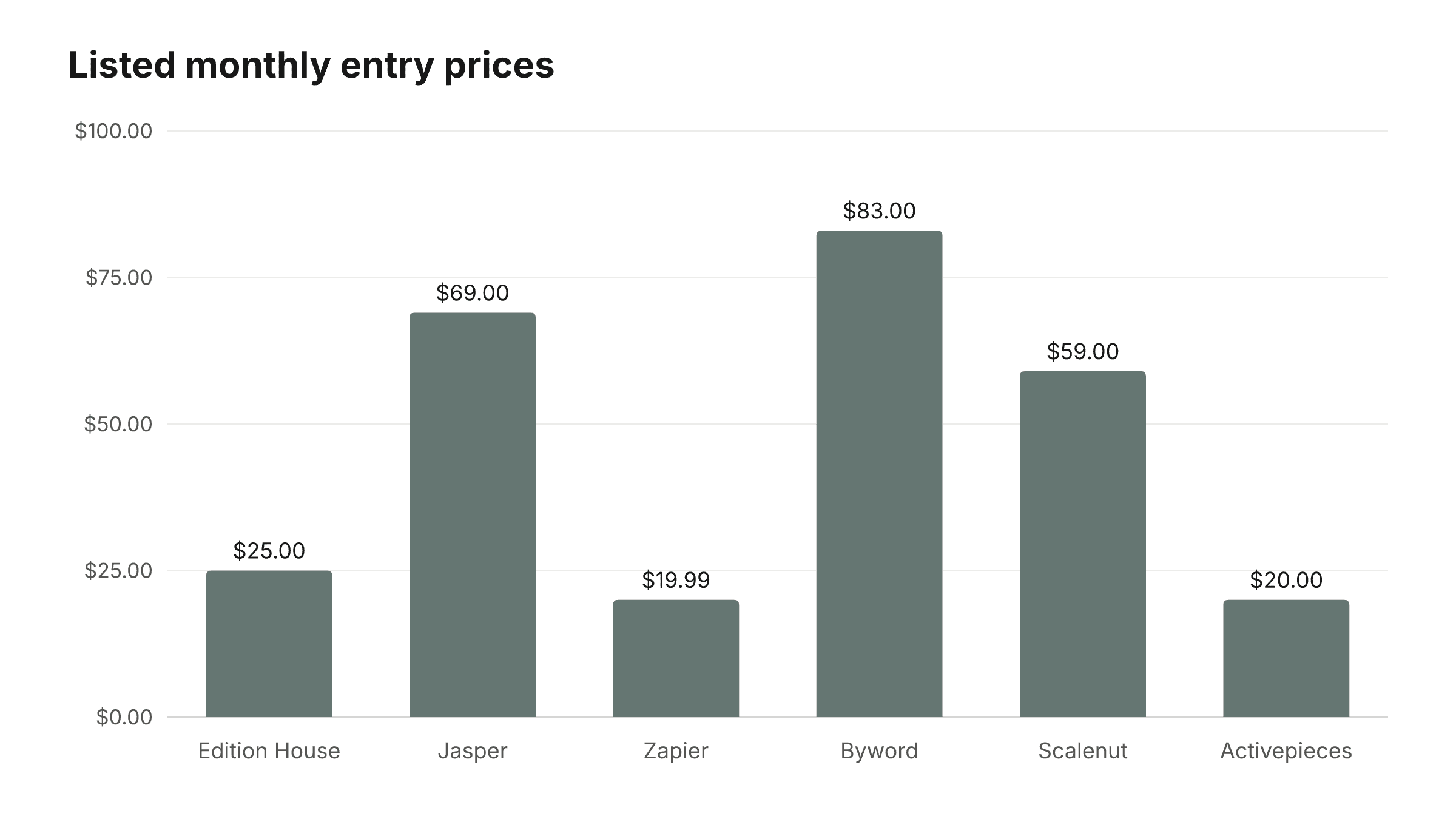
| Product | Listed entry price (USD per month) |
|---|---|
| Edition House | $25 |
| Jasper | $69 |
| Zapier | $19.99 |
| Byword | $83 |
| Scalenut | $59 |
| Activepieces | $20 |
Sources: [1], [4], [7], [8], [13], [15]
Content automation platform for GitHub review: Edition House
Best for: a SaaS team that already publishes from its own repository. Edition House finds an opportunity and hands a scoped change to the customer's own Claude Code routine. That routine opens a draft GitHub pull request, and a person with repository access can merge it or refuse it. Nothing merges or deploys automatically [2]. Edition House doesn't write into your repo, merge or publish; the routine and the merge decision are yours. The automation page describes the handoff in more detail [2].
Not for: teams that want the vendor to publish, update or delete posts in WordPress. A finished article can go to WordPress as a draft post only, with no publish, update or delete path [2]. It also doesn't suit teams without a GitHub review path or a Claude Code routine, or teams that want one-click publishing to several CMSs.
Plan facts, kept apart from the workflow:
- Explorer is £20 or $25 per month and includes two articles or updates a month [1].
- Starter and Growth include a 7-day free trial of one article or update, up to 200 pages and 2 markets. The plan's full allowance starts when the trial ends [1].
Neither fact shows how well the review path fits your team. Only a trial run through your own repository does. This page makes no claim that Edition House produces better prose, more traffic or higher rankings than the tools below.
AI writing and SEO tools for blog drafts
These are writing and optimization tools. They don't hand you a draft pull request, so this section doesn't score them on that.
Jasper. Best for: marketing teams producing on-brand written and visual content across several brands. Pro includes 2 Brand Voices, 5 Knowledge assets and 3 Audiences [4], and teams can share documents and apply status labels to mark what is ready for review [4]. Pro costs $59 a month billed yearly or $69 billed monthly, with a 7-day Pro trial [4]. Not for: teams whose first question is where the draft lands [17]. Jasper's pages don't list a publish destination.
Surfer. Best for: teams that edit in a dedicated Content Editor and send work to WordPress through the free plugin's 1-click export, or work in Google Docs and Contentful [6]. Its Content Editor lets a team use mentions, version history and comments before publishing [6]. Not for: repo-first teams. Discovery is 49 USD a month, billed yearly (Save $120) [5].
Scalenut. Best for: founders who want content auto-published to WordPress or Shopify [13]. Starter is listed at $59 a month, or $24 a month with a 60% OFF limited offer [13], and Scalenut offers a 7-day free trial [13]. Limits include up to 10 prompts with weekly refresh, 1 workspace (one domain), and create, optimize and cluster limits listed as 5 and 10 per month [13]. Not for: teams that need a human gate before publishing. The "factual and plagiarism-free" wording is the vendor's own description [14], not independent proof.
Byword. Best for: high-volume programmatic publishing to WordPress, Webflow and 4 other CMSs in one click [9]. Starter is $83 a month, shown as $3.32 per article (Save $198/yr), with 25 articles a month, $3.50 per extra article, solo use and 5 domains [8]. New users get 5 free articles with no card [8]. Not for: teams that want the refusal step outside the tool, or more than one user on Starter.
ContentBot. Best for: bulk drafting through custom workflows and imports, with output as CSV files, documents or emails [10]. Not for: teams that want drafts to land in a CMS or repo. Prepaid is a once-off payment of $0.5 per 1000 words, covering 15k to 5m words, with 10k words free on first purchase [10]. The 95% uniqueness figure is the vendor's statement [10], not a quality result.
For a broader look at writing and optimization tools, see the best AI SEO tools in 2026.
Workflow automation tools for content publishing
Zapier, Make and Activepieces are connectors. They move content between apps. None of them writes content the way the platforms above do.
Zapier. Professional starts from $19.99 a month, and a new account gets a 14-day Professional trial with no credit card [7]. What it does, plan limits, publish destination and editorial controls are all Not listed. Best for: teams that already know which apps they want to join. Not for: anyone expecting the vendor's pages to spell out a content workflow.
Make. Make connects creative and publishing tools to automate content from ideation to publishing [12], producing content for social channels or websites [12]. Core, priced for 10k credits a month, includes unlimited active scenarios, scheduling down to the minute, increased data transfer limits and Make API access [11]. Starting price and trial are Not listed, and so are editorial controls. Best for: scheduled, multi-step publishing. Not for: teams that need a documented approval step.
Activepieces. Plus is $20 flat a month, and a free plan with no card and no time limit is available [15]. Plus includes 10,000 credits a month, resets monthly, charges $0.007 per credit after that, allows up to 5 users and has unlimited flows [15]. Content can be saved to WordPress for review, and workflows can pause for human approval [16]. Best for: a connector with an explicit human pause. Not for: teams that want the tool itself to judge what is worth writing.
When a content automation platform is the wrong fit
If you are still unsure which kind of tool fits, work through these questions in order.
- Must someone with repo access be able to refuse a draft before merge? Look at repo review tools.
- Do you want the vendor to publish into WordPress, Webflow, Shopify or several CMSs? Look at auto-publish or one-click tools such as Scalenut or Byword.
- Do you mainly need to connect apps, with or without a human pause? Use a connector. Activepieces lists an approval pause; Zapier and Make don't list editorial controls.
- Do you want a writing studio even though its pages don't list a publish destination? Jasper fits, and you handle the handoff yourself.
When Edition House is not the right choice
- You have no GitHub review workflow.
- You don't run a Claude Code routine and don't plan to.
- You need WordPress publish, update or delete. Edition House sends a finished article to WordPress only as a draft post [2].
- You want one-click publishing to several CMSs.
- You want general automation glue rather than a scoped content change sent to your own routine.
Refusing a draft is a normal use of the control you asked for. A closed pull request or an unpublished CMS draft means the approval gate did its job, not that the rollout failed.
Google rules for AI-assisted blog posts
Google's Search guidance says generative AI assistance is compatible with its requirements when the content is accurate, useful and relevant, and wasn't created primarily to manipulate rankings [3]. The guidance judges the page. It doesn't judge the tool, and it doesn't make any product here safe or unsafe for rankings.
That puts the weight on your process. A reviewable draft, a source check, a technical edit and a named approver are how a small SaaS team keeps each page accurate and useful.
Before merging or publishing, ask whether you can test these:
- Front matter and metadata
- Structured data
- Internal links and link checking
- Image metadata
- Canonical handling and redirects
None of the comparison data lists these SEO fields for any product, so treat them as questions to put to a vendor, not features to assume. A pull request has one practical advantage here: your existing CI can run checks on the change before anyone merges it. Edition House's SEO experiments page covers testing changes in more depth.
Content automation platform cost beyond price
The subscription price is only part of the cost. Total cost also includes:
- Setup time
- Upkeep of prompts or routines
- Human editing hours
- Engineering review
- CMS fees
- Usage limits
- Correcting weak or outdated drafts
Take Byword's Starter: $83/mo for 25 articles/month [8]. The real cost goes up with every article someone has to fact-check or rewrite. ContentBot's Prepaid rate is $0.5 per 1000 words [10]. That rate says nothing about editing time.
SaaS product claims go out of date faster than evergreen posts, so favor tools that show sources, assumptions, revision history and a way to update a page. Surfer's Content Editor lists version history and comments [6]. In a pull-request workflow, Git history plays that role, and it sits in your repository.
Don't let Scalenut's limited-time offer or Jasper's yearly-versus-monthly gap tip a workflow decision. Prices were checked on 2026-09-24 and can change; there is a running AI SEO tool price tracker as well.
Content automation platform FAQ
- What is a content automation platform?
- Software that turns research or an opportunity into a draft your team reviews. Publication is a separate step that some tools add.
- Which content automation platform leaves merge control in GitHub?
- Of the products compared, Edition House lists a GitHub review workflow. Your own Claude Code routine opens a draft pull request, and nothing merges automatically. Edition House publishes this comparison.
- Does Edition House publish blog posts for me?
- No. It sends a scoped change to your routine. WordPress receives a draft post only, with no publish, update or delete path.
- Will Google allow AI-assisted blog posts?
- Google says AI assistance is compatible with its Search requirements when the content is accurate, useful and relevant, and not made primarily to manipulate rankings.
- How much does a content automation platform cost?
- Zapier's Professional plan starts from $19.99 a month. Byword lists Starter at $83/mo (Save $198/yr). Make's starting price is Not listed. Editing and review time come on top.
- What is the difference between a draft pull request and one-click CMS publishing?
- A pull request waits for a person to merge it. One-click publishing, such as Byword's, pushes content to the CMS directly.
- Can I stop an automated draft before it ships?
- With a draft pull request, a CMS draft, or an Activepieces approval pause, yes. Check each tool's listed controls.
- Is an app connector the same as a content automation platform?
- No. Zapier, Make and Activepieces move content between apps. They aren't writers.
How to choose a content automation platform this week
Start by writing down the approval path you already use: who reviews, where, and who has the final say. Then decide where a refused draft should live. If it has to stay in GitHub as a closed pull request, repo review tools are your category. If a CMS draft is enough, look at export or save-for-review tools. If you trust a vendor to push live, the one-click publishers are the ones to trial.
Pick one tool of the kind you chose and run a single real article through it end to end, including the refusal step. Before you buy, recheck the vendor's pricing page, because every figure here was read on 2026-09-24. The test that matters is whether your team closed a draft without friction the first time it needed to.
Sources
Every page below was read on 24 September 2026. Where a vendor did not publish a figure as text, this post says so rather than borrowing a number from a review site.
- 1.Pricing
- 2.Automation
- 3.Google Search's guidance on using generative AI content
- 4.Jasper — pricing
- 5.Surfer — pricing
- 6.Surfer — product
- 7.Zapier — pricing
- 8.Byword — pricing
- 9.Byword — product
- 10.ContentBot — product
- 11.Make — pricing
- 12.Make — product
- 13.Scalenut — pricing
- 14.Scalenut — product
- 15.Activepieces — pricing
- 16.Activepieces — product
- 17.jasper.ai